8 min read ·
How to install ComfyUI on Windows and Linux, step by step
Install ComfyUI on Windows and Linux: Desktop, portable build, git clone. Video memory needed (FLUX.1 in fp8 from 16 GB) and what to do with a weak card.
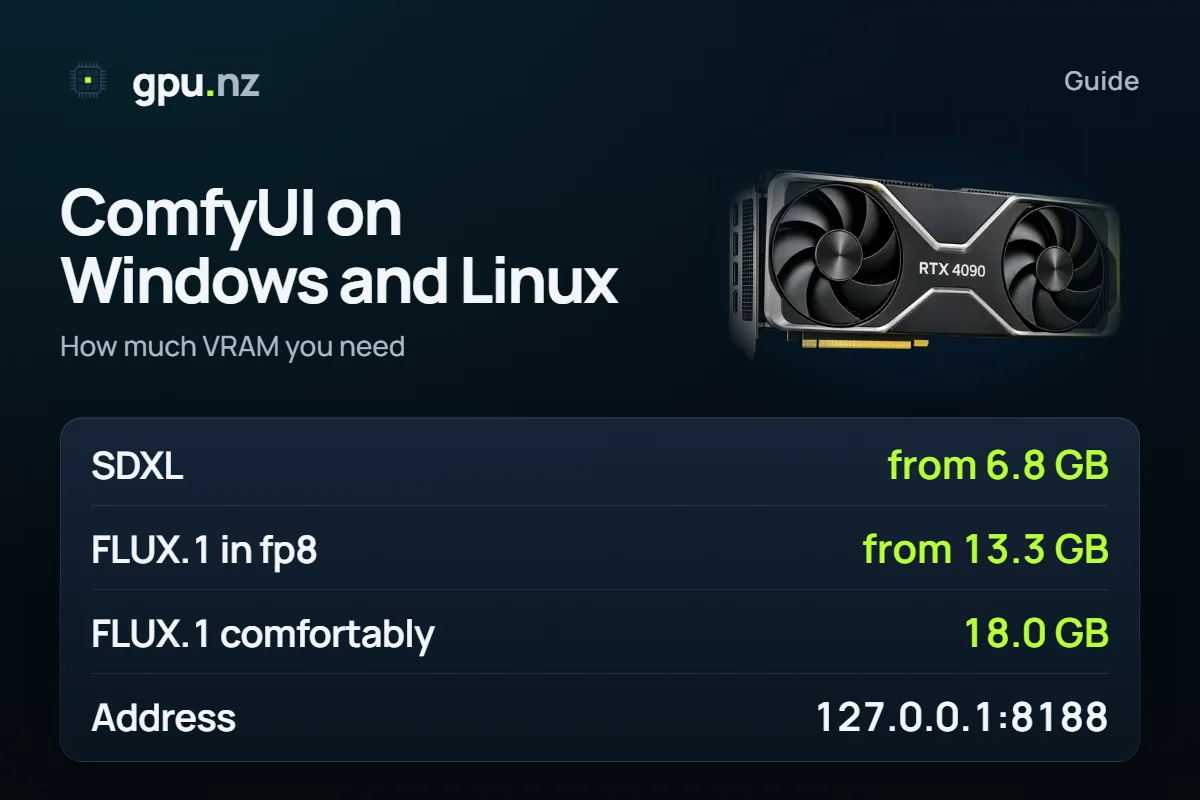
The easiest way to install ComfyUI on your own computer is the Comfy Desktop app: it exists for Windows and macOS, and the installer is on comfy.org/download. On Linux you install ComfyUI from source with git clone, PyTorch for CUDA and python main.py, and the interface opens at http://127.0.0.1:8188. If your video memory falls short (FLUX.1 in fp8 needs at least 13.3 GB), run ComfyUI on a rented GPU in 2–5 minutes.
- ComfyUI's default address on your own computer
- 127.0.0.1:8188
- ComfyUI's default address on your own computer
- SDXL, minimum video memory
- 6.8 GB
- SDXL, minimum video memory
- FLUX.1 [dev] in fp8, minimum
- 13.3 GB
- FLUX.1 [dev] in fp8, minimum
- FLUX.1 [dev] in fp8, comfortable
- 18.0 GB
- FLUX.1 [dev] in fp8, comfortable
Which way of installing should you pick?
There are three official ways, and each suits different systems. The ComfyUI authors recommend Desktop to newcomers and say the Windows portable build is not meant for regular users: with it you track updates yourself.
| Way | System | GPU | When to pick it |
|---|---|---|---|
| Comfy Desktop | Windows, macOS | Windows: NVIDIA or AMD recommended, not required. macOS: Apple Silicon (M1 or later), macOS 13 or later | A first install: it sets up like any ordinary program |
| Portable build | Windows | Separate archives for NVIDIA, AMD and Intel | You want a folder you can copy and update with scripts |
| Manual install | Linux, Windows, macOS | NVIDIA, AMD, Intel, Apple Silicon | Linux, your own Python and control over versions |
The NVIDIA portable build needs an NVIDIA card and a recent driver
The ComfyUI_windows_portable_nvidia.7z archive is built for NVIDIA 20-series cards and newer. There is a separate CUDA 12.6 archive for the 10 series and older, and it must not be used on newer cards. If the build does not start, update the NVIDIA driver first. AMD and Intel have their own archives, and on a Mac use Desktop: the setup there is different.
How much video memory does ComfyUI need?
ComfyUI itself weighs almost nothing; the video memory goes to the model. The table is our estimate for seven setups. “Minimum” means ComfyUI swaps the text encoder out before sampling; “comfortable” means everything sits in video memory at once. SDXL at the minimum runs on a 8 GB card, FLUX.1 in fp8 on a 16 GB one.
- SD 1.53.1 GB
- SDXL8.3 GB
- FLUX.1 [dev] in fp818 GB
- Qwen-Image in fp830.3 GB
| Model and output | Minimum | Comfortable | Smallest card |
|---|---|---|---|
| SD 1.5 512×512 | 2.9 GB | 3.1 GB | 8 GB / 8 GB |
| SDXL 1024×1024 | 6.8 GB | 8.3 GB | 8 GB / 12 GB |
| FLUX.1 [dev] in fp8 1024×1024 | 13.3 GB | 18.0 GB | 16 GB / 24 GB |
| FLUX.1 [dev] in bf16 1024×1024 | 24.3 GB | 33.4 GB | 32 GB / 48 GB |
| Qwen-Image in fp8 1328×1328 | 21.6 GB | 30.3 GB | 24 GB / 32 GB |
| Wan 2.2 TI2V 5B in fp8 1280×704, 121 frames | 11.6 GB | 17.8 GB | 12 GB / 24 GB |
| Wan 2.2 A14B in fp8 1280×720, 81 frames | 21.0 GB | 40.6 GB | 24 GB / 48 GB |
Mind the weight format. FLUX.1 in bf16 needs 24.3 GB even at the minimum, which is why it runs in fp8 on a home card. Video asks for more: Wan 2.2 A14B, with its two experts, takes 40.6 GB comfortably. The other models are compared in the image models VRAM guide, and you can test your own combination in the calculator.
How to install ComfyUI on Windows
For a first install, take Comfy Desktop. Download the installer from comfy.org/download, run it and follow the prompts. On first launch the app asks whether to work on Comfy's cloud or locally on this machine: choose local. Installs live in %LOCALAPPDATA%\Comfy-Desktop\ComfyUI-Installs, the shared model library in %LOCALAPPDATA%\Comfy-Desktop\ComfyUI-Shared, and the log in %APPDATA%\Comfy Desktop\logs.
If you want the portable build for NVIDIA, follow these steps.
Download the archive
ComfyUI_windows_portable_nvidia.7z is on the releases page of the comfyanonymous/ComfyUI repository on GitHub, and the README has a direct link. You do not need any other download site.
Extract it
7-Zip or Windows Explorer will do. If the archive will not extract, right-click the file, open Properties and press Unblock.
Find the right launcher
The folder holds ComfyUI, python_embeded, update and the launchers. For an NVIDIA card you want run_nvidia_gpu.bat; run_cpu.bat starts ComfyUI without a GPU, slowly.
Run run_nvidia_gpu.bat
A console window opens. Wait for the line “To see the GUI go to: http://127.0.0.1:8188”. The browser usually opens by itself; if it does not, type the address in.
Put a model in its folder and refresh the page
Checkpoint files (safetensors) go into ComfyUI\models\checkpoints. Larger models come in several files, each with its own subfolder in ComfyUI\models.
Keep the console window open: closing it stops ComfyUI. To update, the update folder has scripts: update_comfyui.bat fetches the latest commit and update_comfyui_stable.bat the latest stable release.
How to install ComfyUI on a Mac
A Mac needs an Apple Silicon chip (M1 or later) and macOS 13 or later. Open the downloaded .dmg file, drag Comfy Desktop into the Applications folder and launch it from Launchpad or Spotlight. If macOS shows a security warning, go to System Settings, Privacy & Security, and press Open Anyway. The documentation recommends at least 4.85 GB for the installation.
How to install ComfyUI on Linux
There is no Desktop app for Linux, so you install ComfyUI by hand. You need Git and Python: the authors recommend 3.13, or 3.12 if custom-node dependencies give trouble (3.14 works, but some nodes may misbehave). You can make the environment with venv or conda; the documentation uses conda. For an NVIDIA card install PyTorch from the CUDA 13.0 index (cu130), which cards of the 20 series and newer require.
git clone https://github.com/comfyanonymous/ComfyUI.git
cd ComfyUI
python3 -m venv venv
source venv/bin/activate
pip install torch torchvision torchaudio --extra-index-url https://download.pytorch.org/whl/cu130
pip install -r requirements.txt
python main.pyWhen the terminal prints the address line, open http://127.0.0.1:8188 in a browser. Press Ctrl+C to stop ComfyUI. On AMD cards under Linux, install PyTorch from the ROCm 7.2 index, on Intel from the xpu index. They do not need the CUDA packages:
# AMD (Linux)
pip install torch torchvision torchaudio --index-url https://download.pytorch.org/whl/rocm7.2

# Intel
pip install torch torchvision torchaudio --index-url https://download.pytorch.org/whl/xpuThere is also a shortcut through the comfy-cli command line: pip install comfy-cli, then comfy install. Models go into the same folders as on Windows: checkpoints in models/checkpoints, the VAE in models/vae.
How to add ComfyUI-Manager
ComfyUI-Manager installs custom nodes and updates them from the interface. In the ComfyUI repository it is switched on with a flag. From the ComfyUI folder run two commands:
pip install -r manager_requirements.txt
python main.py --enable-managerThe ComfyUI-Manager guide covers the details, working with nodes and rolling back a bad install.
How to reinstall or update ComfyUI
Save your models first: they weigh far more than the program. In the portable build they sit in ComfyUI\models, in Desktop in the shared ComfyUI-Shared folder. Copy them, extract a fresh archive into a new folder or install Desktop again, then put the models back.
To avoid copying gigabytes, point to the old folder in extra_model_paths.yaml: rename extra_model_paths.yaml.example in the ComfyUI root, edit the paths and restart. If something breaks after an update, start with the log. In Desktop that is app.log.
What if your graphics card is too weak?
If your card is smaller than the “Minimum” column, do not torture it. FLUX.1 in fp8 needs a 16 GB card, and 24 GB to work comfortably. You need such a card for hours, not for good, so renting is simpler. ComfyUI is already in the template on the ComfyUI page, and the full cloud route is in the server install guide.
Pick a card from the table
A 24 GB card such as the RTX 4090 is enough for SDXL and FLUX.1 in fp8. For bf16 and video take a bigger one.
Start a server from the ComfyUI template
Open the ComfyUI page and press Rent. The server starts in 2–5 minutes.
Open the interface
The ComfyUI button on the server card opens the same node editor you have on your own computer.
Load a model and a workflow
It is easier to download files straight onto the server: the server install guide shows how.
Stop the server when you are done
Billing is per minute. A stopped server costs nothing for the GPU, only its disk.
Choosing a model is covered by the FLUX guide and the Stable Diffusion guide. To see in advance which card your own combination needs, use the VRAM calculator.
What can go wrong
- ComfyUI will not open at 127.0.0.1:8188. Check that the console window is open and shows the address line. Another process may hold the port: start ComfyUI with --port 8189 and open the new address. 127.0.0.1 works only on the same computer; from another device you need the --listen flag.
- The error “Torch not compiled with CUDA enabled”. The environment has a PyTorch without CUDA. Remove it with pip uninstall torch and install it again from the cu130 index in the block above.
- The portable build will not start. Update the NVIDIA driver. Check that you took the archive for your card series: the cu126 build is not for the 20 series and newer.
- Out of video memory. Lower the resolution and take the model in fp8 or a quantised version. If that does not help, the card is short on memory by the table above.
- Unprotected access from the local network. The --listen flag opens the interface to everyone who can see your computer. Use it only on a network you trust.
How we counted
Commands and file names come from the README of comfyanonymous/ComfyUI and from docs.comfy.org; the default address and port come from comfy/cli_args.py. We made up no system requirements: where a page gives no number (disk, RAM), none appears here. Model memory is computed from the sizes of the published files plus the text encoder, the VAE and working memory: the minimum is the larger of “encoder plus 0.5 GB” and “network plus VAE plus working memory”. The working memory is our estimate, not measured on GPUs. 1 GB here is 1024³ bytes, and a card's usable memory is 97.5% of its nominal size. Data as of 2026-10-19; the other models are in the calculator.
Questions and answers
- How do I install ComfyUI on my computer?
- The easiest way is to download Comfy Desktop from comfy.org/download and run the installer: the app exists for Windows and macOS. Windows also has a portable archive that you only need to extract, and on Linux you install ComfyUI from source with git clone, pip install -r requirements.txt and python main.py.
- How do I install ComfyUI on Linux?
- Clone the comfyanonymous/ComfyUI repository, create a Python environment, install PyTorch from the CUDA index for an NVIDIA card, then the requirements from requirements.txt, and run python main.py. The interface opens at http://127.0.0.1:8188. AMD needs the rocm7.2 index and Intel the xpu one.
- ComfyUI does not open at 127.0.0.1:8188. What should I do?
- Check that the console window running ComfyUI is open and shows the address line: closing the window stops the program. If the port is busy, start ComfyUI with the --port flag and another number. The address 127.0.0.1 works only on the same computer, and another device needs the --listen flag. With Desktop, read the app.log file.
- Where do I download ComfyUI for a PC, and which file is for NVIDIA?
- Download only from the official pages: Comfy Desktop is at comfy.org/download, and the portable archives are on the releases page of the comfyanonymous/ComfyUI repository on GitHub. For an NVIDIA 20-series card or newer you need ComfyUI_windows_portable_nvidia.7z, started with run_nvidia_gpu.bat.
- How do I reinstall ComfyUI and keep my models?
- Copy the model folder: ComfyUI\models in the portable build or the shared ComfyUI-Shared folder in Desktop. Then extract a fresh archive or install Desktop again and put the models back. To skip the copying, point to the old folder in extra_model_paths.yaml.
- What if my graphics card is too weak for ComfyUI?
- Check the table: FLUX.1 in fp8 needs a 16 GB card, and 24 GB to be comfortable. If your memory falls short, rent a GPU and start ComfyUI from the template: the server starts in 2–5 minutes and billing is per minute.


