9 min read ·
A coding agent on your own model: OpenCode, Qwen Code and more
A coding agent on a rented GPU: Qwen 3.8 27B takes 20.7 GB at a 64K context. Setting up OpenCode and Qwen Code, the hourly price, what breaks.
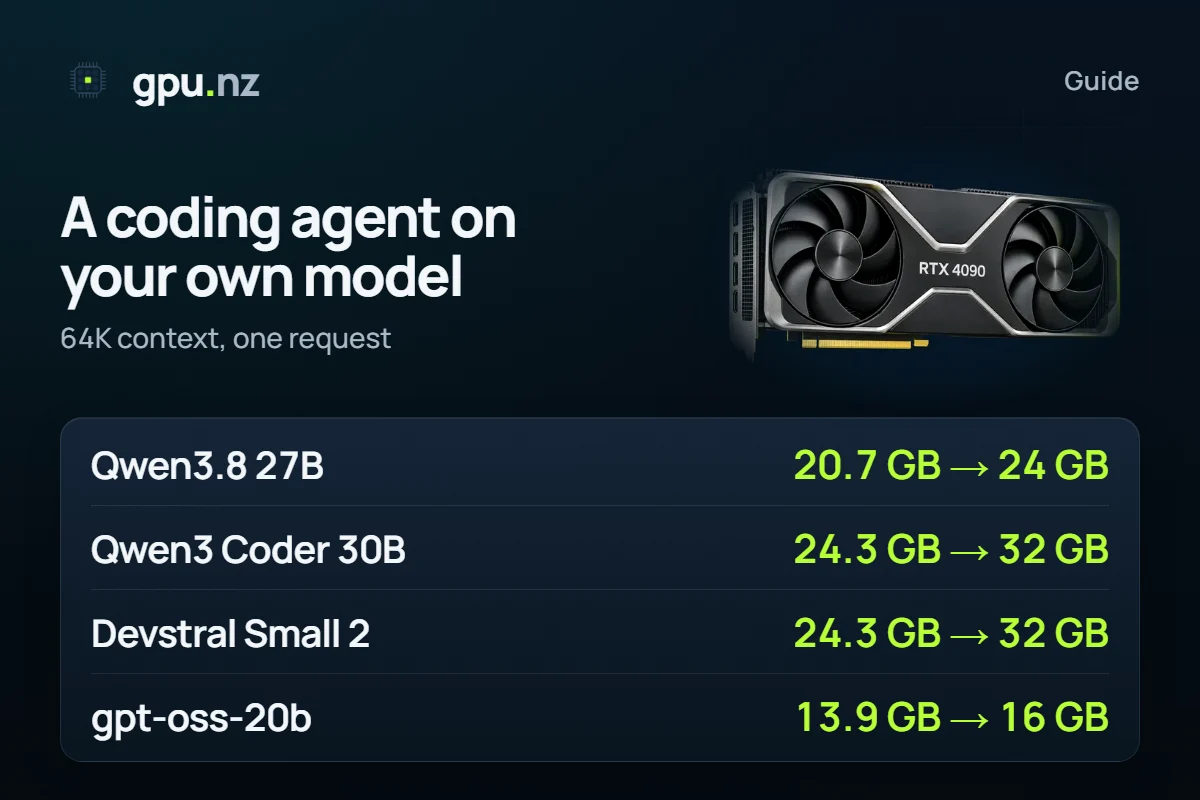
A coding agent on your own model needs a GPU with 24 GB or more, a context of at least 64 thousand tokens and a model that can call tools. Qwen 3.8 27B at a 64K context takes 20.7 GB by our calculation, and Qwen3 Coder 30B-A3B takes 24.3 GB. Below: which agents work with a model that is not theirs, how much memory a long context costs, and two ways to start.
- Qwen 3.8 27B, Q4_K_M, 64K context, 16-bit cache
- 20.7 GB
- Qwen 3.8 27B, Q4_K_M, 64K context, 16-bit cache
- Qwen3 Coder 30B-A3B, same conditions
- 24.3 GB
- Qwen3 Coder 30B-A3B, same conditions
- the least context the Ollama documentation advises for agents
- 64K
- the least context the Ollama documentation advises for agents
- from the click to the first answer in our 2026-11-11 run (a single run)
- ~6.5 min
- from the click to the first answer in our 2026-11-11 run (a single run)
What is a coding agent, and why run it on your own model?
A coding agent is a program on your computer. It reads your project files, runs commands and tests, and edits code. A language model does the thinking, and the agent reaches it over the network: either someone's paid service or an open model on your own rented GPU.
The names are easy to mix up. Qwen Code is a terminal agent, while Qwen3 Coder is a family of models for code. An agent works with any model that speaks the right protocol and can call tools.
Which agents can work with a model of your own?
Most agents talk to a model over an OpenAI-compatible protocol, which is exactly what our Ollama and vLLM templates serve. The exception is Claude Code, which uses Anthropic's format. The last column says what we tested ourselves and what we only read in the documentation.
| Agent | What your model needs and where to set it | What was checked |
|---|---|---|
| OpenCode | The OpenAI Chat Completions protocol. In opencode.json: a provider with the @ai-sdk/openai-compatible package, a baseURL and a list of models | Documentation, 2026-11-16. Our run on 2026-11-11: OpenCode 1.19.5 and Qwen 3.8 27B in Ollama on an RTX 4090, tool calls worked (a single run) |
| Qwen Code | An OpenAI-compatible address. In ~/.qwen/settings.json: a modelProviders block with baseUrl and envKey; the server must support tool calls | Documentation, 2026-11-16. We have not run it |
| Kimi Code CLI | A provider with type = "openai" in ~/.kimi-code/config.toml: base_url, api_key, and max_context_size on the model | Documentation, 2026-11-16. We have not run it |
| Claude Code | The Anthropic Messages format; the address is set by the ANTHROPIC_BASE_URL variable | Anthropic says it does not support running Claude Code on non-Claude models through gateways; Ollama describes such a setup in its own documentation. We have not tested it |
| gpu.nz Code | Nothing: the app rents the server, starts the model and connects the agent itself | Our run on 2026-11-11, the same as OpenCode, which the app is built on |
Which open model should you take for an agent?
Start with Qwen 3.8 27B: it is the only model we tested with the agent, and it fits a 24 GB card. The others below are picked for their size and purpose; we have not compared their quality, so try them on your own tasks.
- **Qwen 3.8 27B** — a dense model with 27.78B parameters and a context of up to 256K. The gpu.nz Code app offers it out of the box.
- **Qwen3 Coder 30B-A3B** — a Mixture-of-Experts model for code: 30.53B parameters, about 3.3B of them working on each token. Context up to 256K.
- **Devstral Small 2 24B** — dense, 24.01B parameters, context up to 384K. Its context cache is noticeably heavier than its neighbours'.
- **GLM-4.7 Flash** — 31.22B parameters, about 3B active, context up to 198K.
- **GPT-OSS 20B** — 20.91B parameters in its native MXFP4, the lightest on the list: a 16 GB card holds even a 64K context.
Larger models come down to the number of cards. Qwen3 Coder 480B-A35B at Q4_K_M with a 64K context takes 286.7 GB: at least 4 × 80 GB. Kimi K2 from Moonshot AI needs at least 8 × 80 GB. The Kimi Code CLI agent is not tied to it: you can point it at any model from the list above.
The key requirement is tool calling. An agent does not just answer questions: it asks the model to “read a file” or “run a command”. A model that cannot do that cannot work with your files. The Qwen Code documentation says outright that the server must have tool calling on, and OpenCode has a tip for Ollama: if tool calls fail, raise num_ctx to 16–32 thousand tokens.
How much VRAM does an agent need with a long context?
An agent sends the model not a question but everything it has gathered: instructions, pieces of files, command output. Contexts of tens of thousands of tokens are normal, and the context cache grows with every token. The Ollama documentation advises at least 64 thousand tokens for agents and coding tools.
- Qwen 3.8 27B20.7 GB
- Qwen3 Coder 30B-A3B24.3 GB
- Devstral Small 2 24B24.3 GB
- GLM-4.7 Flash21.4 GB
- GPT-OSS 20B13.9 GB
The full table: memory at 32K, 64K and 128K tokens with the usual 16-bit cache and with an 8-bit one. It matters most for models with a heavy cache. Devstral Small 2 at 128K with a 16-bit cache wants a 48 GB card, and with an 8-bit one 32 GB.
| Model | 32K | 64K | 128K | 64K, 8-bit cache | 128K, 8-bit cache |
|---|---|---|---|---|---|
| Qwen 3.8 27B | 18.7 GB 24 GB card | 20.7 GB 24 GB card | 24.7 GB 32 GB card | 18.8 GB 24 GB card | 20.9 GB 24 GB card |
| Qwen3 Coder 30B-A3B | 21.3 GB 24 GB card | 24.3 GB 32 GB card | 30.3 GB 32 GB card | 21.5 GB 24 GB card | 24.7 GB 32 GB card |
| Devstral Small 2 24B | 19.3 GB 24 GB card | 24.3 GB 32 GB card | 34.3 GB 48 GB card | 19.7 GB 24 GB card | 25.0 GB 32 GB card |
| GLM-4.7 Flash | 19.8 GB 24 GB card | 21.4 GB 24 GB card | 24.7 GB 32 GB card | 19.9 GB 24 GB card | 21.6 GB 24 GB card |
| GPT-OSS 20B | 13.2 GB 16 GB card | 13.9 GB 16 GB card | 15.4 GB 16 GB card | 13.2 GB 16 GB card | 14.0 GB 16 GB card |
An 8-bit cache takes about half the memory of a 16-bit one with a very small loss in precision, according to the Ollama documentation. At 64K it moves Qwen3 Coder 30B-A3B from a 32 GB card to a 24 GB one (24.3 GB against 21.5 GB). Devstral Small 2 moves from a 32 GB card to a 24 GB one. In Ollama these are three server variables, and the 8-bit cache works only with flash attention:
OLLAMA_FLASH_ATTENTION=1
OLLAMA_KV_CACHE_TYPE=q8_0
OLLAMA_CONTEXT_LENGTH=65536The calculation is a lower bound. For Qwen 3.8 27B at 64K the calculator gives 20.7 GB and a 24 GB card. Yet in our 2026-11-11 run on an RTX 4090 with the default cache part of the model spilled to the CPU and the speed dropped by about a third. With an 8-bit cache (18.8 GB by calculation) the model stayed on the GPU. Check with ollama ps: the PROCESSOR column should read “100% GPU”.
Set the context yourself: Ollama cuts a long prompt silently
In our 2026-11-11 run Ollama cut a prompt longer than the context window without an error: the answer came back with HTTP 200. The agent cannot tell that part of its request was lost, and the server keeps billing by the minute. The Ollama documentation says the default window depends on memory: 4 thousand tokens below 24 GiB, 32 thousand at 24–48 GiB. The Open WebUI + Ollama template starts with 8 thousand, so set the window for an agent yourself: OLLAMA_CONTEXT_LENGTH=65536 in Ollama or --max-model-len in vLLM.
To check your own model, quantisation and context length, use the calculator:
What does an hour cost, and how is it different from a subscription?
There is no per-token price and no request limit here: you pay for the minutes the server is on. Subscriptions to coding services work differently: a fixed monthly fee with limits of their own. Which is cheaper depends on how many hours a month your agent really works. Multiply those hours by the hourly price on the cards below, and stop the server whenever the agent is idle.
How do you point an agent at your own address?
You need two things: an address ending in /v1 and a token. In the Ollama templates the address is https://<id>-11434.run.gpu.nz/v1, in vLLM https://<id>-8000.run.gpu.nz/v1, and the token is on the server page (more in the Ollama and vLLM guide). The formats below were checked against the documentation on 2026-11-16. OpenCode now has two branches, V1 and V2, and V2 reads a V1 config as it is, so one file suits both.
OpenCode: opencode.json in the project folder or ~/.config/opencode/opencode.json. The token comes from the GPUNZ_TOKEN variable.
{
  "$schema": "https://opencode.ai/config.json",
  "model": "gpunz/qwen3.8:27b",
  "provider": {
    "gpunz": {
      "npm": "@ai-sdk/openai-compatible",
      "name": "gpu.nz",
      "options": {
        "baseURL": "https://<id>-11434.run.gpu.nz/v1",
        "apiKey": "{env:GPUNZ_TOKEN}"
      },
      "models": {
        "qwen3.8:27b": {
          "name": "Qwen 3.8 27B",
          "limit": { "context": 65536, "output": 8192 }
        }
      }
    }
  }
}Qwen Code: ~/.qwen/settings.json. Set GPUNZ_TOKEN in your environment; the settings name it in envKey.
{
  "modelProviders": {
    "openai": [
      {
        "id": "qwen3.8:27b",
        "name": "Qwen 3.8 27B (gpu.nz)",
        "envKey": "GPUNZ_TOKEN",
        "baseUrl": "https://<id>-11434.run.gpu.nz/v1",
        "generationConfig": { "contextWindowSize": 65536 }
      }
    ]
  },
  "security": { "auth": { "selectedType": "openai" } },
  "model": { "name": "qwen3.8:27b" }
}Kimi Code CLI: ~/.kimi-code/config.toml. By default it guesses a model's capabilities from its name, so for your own model it is better to list them.
default_model = "gpunz"

[providers.gpunz]
type = "openai"
base_url = "https://<id>-11434.run.gpu.nz/v1"
api_key = "<token>"

[models."gpunz"]
provider = "gpunz"
model = "qwen3.8:27b"
max_context_size = 65536
capabilities = ["tool_use"]Route 1: gpu.nz Code, with no setup
gpu.nz Code is our free open-source app (MIT): a coding agent that rents a server itself, starts an open model on it and connects to it. It is built on OpenCode and is not affiliated with its team. It runs on Windows, macOS and Linux.
Install the app and sign in
Download the build for your system from the gpu.nz Code page and sign in with your gpu.nz account. Your balance needs funds: the server is paid from it.
Pick a model
Qwen 3.8 27B is the one tested with the agent. For your own, enter an Ollama name or a link to a GGUF on Hugging Face: the app works out the GPU and shows the hourly price before launch. It picks the server itself.
Wait for the launch
The first launch usually takes 5–14 minutes while the server downloads the model. In our 2026-11-11 run it was about six and a half minutes from the click to the first answer.
Open your project folder and describe the task
The agent runs on your computer and the project is not uploaded: only requests to the model go to your server. The agent asks before destructive commands.
Choose the idle shutdown
The server is deleted after 15, 30 or 60 minutes of idling and when you quit the app. If you turned the shutdown off, delete the server yourself. Details are in the documentation.
Route 2: your own server and any agent
Want another agent or another model? Rent a server with a template and connect the agent with the address from the section above.
Copy the address and the token
On the server page the «Ollama API» button opens the model list; paste the address up to /v1 and the token into the agent's settings.
Set the context and check it
In the Ollama template set the variables from the memory section. Over SSH run ollama ps: the CONTEXT column should show your value, and PROCESSOR should say “100% GPU”.
Paste the settings into the agent
The OpenCode, Qwen Code or Kimi Code CLI config from the section above; the model name is the one in the «Ollama API» list.
Stop the server when you are done
A stopped server costs nothing for the GPU, only its disk.
On vLLM the start looks like this. The tool-calling flags are what the agent needs, and the parser name depends on the model: take it from the vLLM documentation on tool calling.
vllm serve <model> --port 8000 --api-key <token> --max-model-len 65536 --enable-auto-tool-choice --tool-call-parser <parser>What can go wrong
- Part of the model spilled to the CPU. Answers slow down by about a third, and ollama ps shows a CPU share. Shrink the cache to 8 bits, cut the context or take a bigger card.
- The model does not call tools. The agent answers in text and does not touch files. In vLLM turn on --enable-auto-tool-choice and a parser for your model. In OpenCode V2 models discovered on vLLM start with tools disabled, so describe the model in the config yourself.
- The context window is smaller than the agent thinks. The agent's setting (limit.context, contextWindowSize, max_context_size) must hold the same number as the server.
- A long first launch. While the server downloads the model it is already billed by the minute: those 5–14 minutes.
- A forgotten server. The agent is silent and the server keeps running. Turn on the idle shutdown or stop the server by hand.
- The tools change fast. Our run used OpenCode 1.19.5, and on 2026-11-16 the project's repository was already at version 2.3.0. Check the settings against the documentation for your version.
How we counted
Memory comes from the gpu.nz calculator: weights are real file sizes, the context cache follows each model's config.json, and the 8-bit cache is counted as 8.5 bits per value. Data as of 2026-10-19. One request, Q4_K_M, GPT-OSS 20B in its native MXFP4. 1 GB here is 1024³ bytes, as on GPUs. More on quantisation and the cache is in the GGUF article, and on LLM memory in the table for 35 models.
Our run was on 2026-11-11, one launch of each variant, and we do not generalise it: OpenCode 1.19.5 with Qwen 3.8 27B in Ollama through an OpenAI-compatible address on a rented RTX 4090. Tool calls worked; with a 64K context on a 24 GB card the cache had to be 8-bit for the model to stay on the GPU.
The agents' settings and what we say about them were checked on 2026-11-16 against the official documentation: opencode.ai/docs (V1 and V2), Qwen Code (qwenlm.github.io/qwen-code-docs), Kimi Code CLI (moonshotai.github.io/kimi-code), Claude Code (code.claude.com/docs, the gateways page), Ollama (docs.ollama.com: context-length, faq, anthropic-compatibility) and vLLM (docs.vllm.ai, tool calling). We have not run Qwen Code, Kimi Code CLI or Claude Code on our servers, and we have not compared model quality. There are no prices in the text: they are on the cards.
Questions and answers
- How do I connect OpenCode to my own model in Ollama?
- In opencode.json add a provider with the @ai-sdk/openai-compatible package, the server address ending in /v1 as options.baseURL, and the model name under models. If the API is behind a token, put it in options.apiKey. Set the Ollama context to at least 16–32 thousand tokens, and for an agent 64K is better.
- Which model suits OpenCode and Qwen Code on a 24 GB card?
- Qwen 3.8 27B: at a 64K context it takes 20.7 GB by calculation and 18.8 GB with an 8-bit cache. Qwen3 Coder 30B-A3B and Devstral Small 2 fit 24 GB at 64K only with an 8-bit cache: 21.5 GB and 19.7 GB.
- How much VRAM does a coding agent need at a 64K context?
- From 13.9 GB for GPT-OSS 20B to 24.3 GB for Qwen3 Coder 30B-A3B and Devstral Small 2 with the usual 16-bit cache. With an 8-bit cache the same two take 21.5 GB and 19.7 GB.
- Can I run Claude Code on my own open model?
- Claude Code uses the Anthropic Messages format, and the address is set by the ANTHROPIC_BASE_URL variable. Anthropic says it does not support running Claude Code on non-Claude models through gateways, while Ollama describes such a setup in its documentation. We have not tested it and do not promise that it works.
- What is Qwen Code, and how is it different from Qwen3 Coder?
- Qwen Code is a terminal agent under the Apache-2.0 licence, while Qwen3 Coder is a family of models for code. You can point the agent at your own OpenAI-compatible address and run the model on a rented GPU.
- How do I start a coding agent without setting up a server?
- Install the free gpu.nz Code app: it rents the server, starts the model and connects the agent itself. The first launch takes 5–14 minutes, the server is billed by the minute and deleted after the idle time you choose: 15, 30 or 60 minutes.


