11 min read ·
GGUF, Q4_K_M, FP8, MXFP4 explained: how much memory they save
Qwen3.8 27B: 50.9 GB at BF16, 15.3 GB at Q4_K_M. What GGUF, Q8_0, FP8 and MXFP4 mean, how much memory each format saves and how to download the file you need.
Quantisation stores a model's weights in 8, 6, 4 or 3 bits instead of 16, and the file shrinks by 1.9–5.3 times. Qwen3.8 27B weighs 50.9 GB as original BF16 and 15.3 GB as Q4_K_M, so at an 8K context it needs a 24 GB card instead of an 80 GB one. Below: what GGUF, Q8_0, Q4_K_M, FP8 and MXFP4 mean, a memory table for four models, quality tests and the commands to download the file you need.
- Qwen3.8 27B, original BF16 weights
- 50.9 GB
- Qwen3.8 27B, original BF16 weights
- the same weights at Q4_K_M: 3.3 times smaller
- 15.3 GB
- the same weights at Q4_K_M: 3.3 times smaller
- per parameter on average at Q4_K_M: some tensors are stored more precisely
- 4.84 bits
- per parameter on average at Q4_K_M: some tensors are stored more precisely
- GPT-OSS 120B in native MXFP4, 8K context: one 80 GB card
- 60.5 GB
- GPT-OSS 120B in native MXFP4, 8K context: one 80 GB card
What is GGUF: a file format or a quantisation?
GGUF is a file format, not a way of compressing. One file holds the model's weights and its metadata: architecture parameters, the tokenizer, the chat template. By its authors' description, the format is built for fast loading in llama.cpp and the programs that run on its engine, such as Ollama and LM Studio.
The weights inside GGUF can be stored at different precisions, from F32 and BF16 down to two bits and below. The suffix in the file name says which: Q8_0, Q4_K_M. By comparison, safetensors stores only tensors, while GGUF adds a standard set of metadata.
So “download GGUF” is an incomplete request: a repository holds dozens of files for one model, and what you have to choose is the quantisation.
What do Q8_0, Q6_K, Q4_K_M and Q2_K mean in a file name?
The digit after Q is roughly the bits per weight, K marks the k-quant family, and M is a mix variant.
- Q and the digit. The bits stored per weight. The original model uses 16.
- K. Weights are cut into blocks, each block has its own scale, and blocks are grouped into super-blocks (as described in llama.cpp pull request #1684).
- The 0 in Q8_0. A simpler scheme: a block of 32 weights and one multiplier. The multiplier adds half a bit, so Q8_0 is 8.5 bits per weight, not 8.
- S, M, L. Mix variants: one model uses several types. In Q4_K_M most weights are in 4-bit Q4_K, half of the attention.wv and feed_forward.w2 tensors are in 6-bit Q6_K, and the output layer is always 6-bit.
That is why Q4_K_M is 4.84 bits per parameter, not 4. It is also the default: Ollama picks Q4_K_M when the file exists in a Hugging Face repository, and llama.cpp with the -hf flag does the same.
All formats of this article in one table. The bits are measured on published files; the last three rows are not k-quants.
| Format | Bits per parameter | Smaller than BF16 | What it is |
|---|---|---|---|
| BF16 | 16 | 1× | The original weights as 16-bit numbers. |
| FP8 | 8.4 | 1.9× | 8-bit floating-point numbers. A format for vLLM. |
| Q8_0 | 8.5 | 1.9× | GGUF, blocks of 32 weights. Almost lossless. |
| Q6_K | 6.56 | 2.4× | GGUF, a k-quant. Almost lossless. |
| Q5_K_M | 5.68 | 2.8× | GGUF, a k-quant. |
| Q4_K_M | 4.84 | 3.3× | GGUF, a k-quant. The default of Ollama and llama.cpp. |
| Q3_K_M | 3.9 | 4.1× | GGUF, a k-quant. Losses grow. |
| Q2_K | 3 | 5.3× | GGUF, a k-quant. Compressed hardest, with clear losses. |
| MXFP4 | 4.25 | 3.8× | 4-bit numbers with a shared scale per block; the GPT-OSS format. Bits are for the expert weights. |
| AWQ, GPTQ | about 4 | — | 4-bit integers (INT4) for GPU engines such as vLLM. |
| UD-…_XL | — | — | GGUF from Unsloth: the type is chosen for each layer. |
How do FP8, MXFP4, AWQ and GPTQ differ from GGUF?
They are other formats for other programs. Ollama, LM Studio and llama.cpp read GGUF. FP8, AWQ and GPTQ are meant for GPU servers such as vLLM, and MXFP4 is the native format of GPT-OSS. How to choose a program is in the guide Ollama, LM Studio, llama.cpp or vLLM.
- FP8 — 8-bit floating-point numbers. The vLLM documentation says FP8 halves a model's memory; for Qwen3.8 27B the file is 1.8 times smaller (28.7 GB against 50.9 GB). Cards with compute capability 8.9 or higher — Ada, Hopper and Blackwell, such as the RTX 4090 and H100 — can compute in FP8. On an RTX 3090 or A100 you also save memory, but the maths runs in 16 bits.
- MXFP4 — 4-bit numbers with a shared scale per block. OpenAI released GPT-OSS in it: according to the model card, the expert weights are over 90% of the parameters and are stored at 4.25 bits. GPT-OSS 120B weighs 59.0 GB instead of 217.6 GB at BF16 (estimated from the parameter count) and fits on one 80 GB card.
- AWQ and GPTQ — 4-bit integers (INT4; GPTQ also comes in 8-bit). vLLM loads ready checkpoints from Hugging Face; by its documentation the gain is lower memory and latency. vLLM reads GGUF only experimentally, so for vLLM take FP8 or AWQ.
- UD-…_XL from Unsloth. Dynamic quantisation: the type is chosen for each layer separately. The documentation does not expand “UD” or “XL”. In our tables, Qwen3.8 27B and Gemma 4 31B have UD-Q2_K_XL in the Q2_K place: there is no plain file.
How much memory does quantisation save on real models?
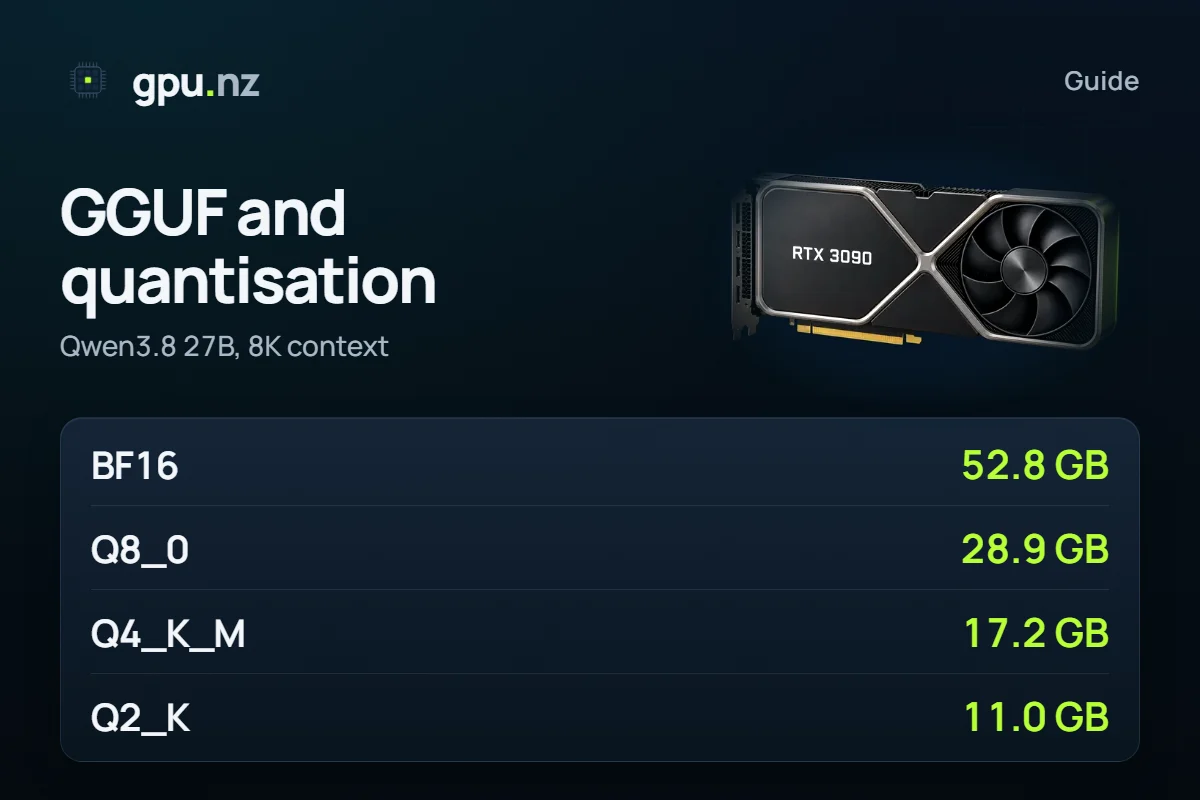
Q4_K_M makes the weights 3.3 times smaller and the total a little less: the context cache and the runtime are not compressed. Qwen3.8 27B at an 8K context takes 52.8 GB at BF16 and 17.2 GB at Q4_K_M — 3.1 times less. Choosing among Qwen models is covered in Which Qwen model to choose.
- BF16original weights52.8 GB
- FP8vLLM30.6 GB
- Q8_0GGUF28.9 GB
- Q6_K22.3 GB
- Q5_K_M20.3 GB
- Q4_K_MOllama's default17.2 GB
- Q2_KUD-Q2_K_XL11 GB
The table covers four models: Qwen3.8 27B, Llama 3.3 70B, Gemma 4 31B and Qwen3 8B. Each cell shows, in GB, the memory at an 8K context, the weights and the smallest card; a dash means no such file exists.
| Format | Qwen3.8 27B | Llama 3.3 70B | Gemma 4 31B | Qwen3 8B |
|---|---|---|---|---|
| BF16 | 52.8 GB weights 50.9, card 80 | 134.9 GB weights 131.4, card 141 | 59.9 GB weights 57.2, card 80 | 17.4 GB weights 15.3, card 24 |
| FP8 | 30.6 GB weights 28.7, card 32 | — | — | 11.0 GB weights 8.8, card 12 |
| Q8_0 | 28.9 GB weights 27.1, card 32 | 73.3 GB weights 69.8, card 80 | 33.1 GB weights 30.4, card 48 | 10.3 GB weights 8.1, card 12 |
| Q6_K | 22.3 GB weights 20.5, card 24 | 57.4 GB weights 53.9, card 80 | 26.1 GB weights 23.5, card 32 | 8.4 GB weights 6.3, card 12 |
| Q5_K_M | 20.3 GB weights 18.4, card 24 | 50.0 GB weights 46.5, card 80 | 22.8 GB weights 20.2, card 24 | 7.6 GB weights 5.4, card 8 |
| Q4_K_M | 17.2 GB weights 15.3, card 24 | 43.1 GB weights 39.6, card 48 | 19.7 GB weights 17.1, card 24 | 6.8 GB weights 4.7, card 8 |
| Q3_K_M | — | 35.4 GB weights 31.9, card 48 | 16.4 GB weights 13.7, card 24 | 6.0 GB weights 3.8, card 8 |
| Q2_K | 11.0 GB weights 9.2, card 12 (UD-Q2_K_XL) | 28.1 GB weights 24.6, card 32 | 13.6 GB weights 11.0, card 16 (UD-Q2_K_XL) | 5.2 GB weights 3.1, card 8 |
Cards come only in steps — 12, 16, 24, 32, 48, 80 GB — so what matters is not how much you saved but whether you crossed a step. For Qwen3.8 27B, Q4_K_M, Q5_K_M and Q6_K all fit a 24 GB card, Q8_0 and FP8 need a 32 GB one, and BF16 needs an 80 GB one. Llama 3.3 70B fits a 48 GB card at Q4_K_M and an 80 GB one at Q8_0. For Gemma 4, see the guide on its VRAM needs.
Why is the file not “parameters × bits ÷ 8”?
The rule gives the right order of magnitude but is off by a few percent. The table sets the calculation from the bits above against the real file size.
| Model and format | By the rule, GB | The file, GB | Difference |
|---|---|---|---|
| Qwen3.8 27B, Q4_K_M | 15.7 | 15.3 | −2.0% |
| Qwen3.8 27B, FP8 | 27.2 | 28.7 | +5.8% |
| Qwen3.8 27B, Q2_K (UD-Q2_K_XL) | 9.7 | 9.2 | −5.6% |
| Llama 3.3 70B, Q4_K_M | 39.8 | 39.6 | −0.4% |
| Gemma 4 31B, Q4_K_M | 17.6 | 17.1 | −3.1% |
| Qwen3 8B, Q4_K_M | 4.6 | 4.7 | +1.5% |
| Qwen3 8B, FP8 | 8.0 | 8.8 | +9.7% |
The gap runs from −5.6% to +9.7%. For Llama 3.3 70B at Q4_K_M it is only 0.4%, while the Qwen3 8B file at FP8 is 9.7% larger than the rule says. Most likely the cause is tensors that stay more precise: the k-quants output layer is stored in 6 bits, and in a small model it is a larger share. The Qwen3.8 27B and Gemma 4 31B files, on the other hand, are smaller than the rule; the table cannot tell why. That is why the calculator uses the sizes of real files, not the rule.
How much quality does quantisation lose?
In two published tests, Q8_0 and Q6_K are close to the original model, Q4_K_M loses a little, Q3_K_M more, and Q2_K clearly. These are other people's measurements: we did not measure quality.
| Format | Bits per parameter | Gemma 3 27B, MMLU 5-shot, % | LLaMA 7B, perplexity |
|---|---|---|---|
| BF16 / F16 | 16 | 71.5 | 5.9066 |
| Q8_0 | 8.5 | 71.60 | — |
| Q6_K | 6.56 | 71.87 | 5.9110 |
| Q5_K_M | 5.68 | 71.77 | 5.9208 |
| Q4_K_M | 4.84 | 71.23 | 5.9601 |
| Q3_K_M | 3.9 | 70.70 | 6.1503 |
| Q2_K | 3 | 68.50 | 6.7764 |
Sources: the Unsloth Dynamic 2.0 documentation (Gemma 3 27B) and llama.cpp pull request #1684 (LLaMA 7B; lower perplexity is better). Perplexity rises slowly down to Q4_K_M (5.96 against 5.91) and sharply at Q2_K (6.78).
These tests have limits. Both models are old, each test is a single one, and it does not show how a format affects code, maths or Russian. Differences of a few tenths of a point are noise: Q6_K scored higher than Q8_0. So check the file you choose on your own prompts — on a rented card that is an hour of work.
What does quantising the context cache give?
The context cache can be halved too, without touching the weights. The cache is the memory where the model keeps the keys and values of tokens it has already read, and it grows with the conversation. For Llama 3.3 70B at Q4_K_M, the cache for 32K tokens takes 10.0 GB in FP16 and 5.3 GB in q8.
- 8K, FP16 cache43.1 GB
- 32K, FP16 cache50.6 GB
- 32K, q8 cache45.9 GB
- 128K, FP16 cache80.6 GB
- 128K, q8 cache61.8 GB
At a 32K context Llama 3.3 70B takes 50.6 GB and needs an 80 GB card. With a q8 cache it takes 45.9 GB: a 48 GB card is enough, though only just. At 128K the gain is clearer: a 96 GB card becomes an 80 GB one.
A small cache gains less. For Qwen3.8 27B the q8 cache saves only 0.23 GB at 8K and 3.8 GB at 128K, which is enough to move from a 32 GB card to a 24 GB one.
# llama.cpp
llama-server -hf unsloth/Qwen3-8B-GGUF:Q4_K_M -ctk q8_0 -ctv q8_0 -fa on

# vLLM
vllm serve <model> --kv-cache-dtype fp8

# Ollama: server environment variables
OLLAMA_KV_CACHE_TYPE=q8_0
OLLAMA_FLASH_ATTENTION=1
The price is precision. The Ollama documentation calls the loss at q8_0 “very small” and at q4_0 “small-medium”; there is one cache type for all models. vLLM warns that sliding-window layers, as in Gemma 4, are more sensitive to the compression.
Which format should you choose?
Start with Q4_K_M. If you have the memory, take Q8_0 or FP8; go below Q4 only when the file does not fit otherwise.
- You have the memory. In the tests above Q8_0 is close to the original model; the vLLM equivalent is FP8, which they do not cover. Qwen3.8 27B at 8K: Q8_0 28.9 GB, FP8 30.6 GB, a 32 GB card.
- The usual case. Q4_K_M. Qwen3 8B takes 6.8 GB, Gemma 4 31B 19.7 GB, Qwen3.8 27B 17.2 GB and Llama 3.3 70B 43.1 GB: 8 GB, 24 GB, 24 GB and 48 GB cards.
- The card is too small. Going below Q4_K_M pays only if the file crosses a step. Llama 3.3 70B at Q3_K_M (35.4 GB) still needs a 48 GB card, like Q4_K_M, so nothing is gained. Q2_K (28.1 GB) fits a 32 GB card, but its losses are the largest.
- vLLM. Take FP8 on Ada, Hopper and Blackwell cards, and AWQ when you want 4 bits. For GPT-OSS there is nothing to choose: the model ships in MXFP4.
Check your own setup
Pick the model, the format and the context length: the calculator shows the memory and the catalog GPUs that run it for the least money. The rule of thumb is in the guide on VRAM for LLMs, and one table for 35 models is in How much VRAM do open LLMs really need?.
How to download the quant you need on a rented GPU
The Open WebUI + Ollama template takes GGUF straight from Hugging Face: write the name as hf.co/organisation/repository:quant. The examples use Qwen3 8B: at Q8_0 it needs 10.3 GB (a 12 GB card), at Q4_K_M 6.8 GB (an 8 GB card).
Pick a card from the memory table
Find your model and format in the table above, open the catalog and press Rent. Choose the Open WebUI + Ollama template: it runs on cards from 8 GB.
Enter the model and quant in the Model field
Take a disk of at least 40 GB, with room beyond the file size. If the tag you want does not exist, use the whole file name: Ollama accepts that too.
hf.co/unsloth/Qwen3-8B-GGUF:Q8_0Wait for the file to download
The template downloads the model on first start, usually in 3–10 minutes; a large quant takes longer. A message tells you when the chat is ready.
Compare another quant of the same model
Connect over SSH, pull a second file and run it. Remove the model you do not need with ollama rm.
ollama pull hf.co/unsloth/Qwen3-8B-GGUF:Q4_K_M ollama run hf.co/unsloth/Qwen3-8B-GGUF:Q4_K_M ollama rm hf.co/unsloth/Qwen3-8B-GGUF:Q8_0Stop the server when you are done
Stopping ends the GPU charge, while the disk with the files is billed until you delete the server.
For vLLM, take an FP8 checkpoint and turn on the FP8 cache. Start it as in the vLLM template, with another model and the flag:
pkill -f api_server
nohup python3 -m vllm.entrypoints.openai.api_server --host 0.0.0.0 --port 8000 \
  --model Qwen/Qwen3-8B-FP8 --kv-cache-dtype fp8 --max-model-len 8192 \
  --api-key <rental token> > /var/log/vllm.log 2>&1 &
What can go wrong
- The quant does not fit in video memory. Ollama and llama.cpp put some layers in system RAM and start anyway, but answers get noticeably slower. The Processor column of ollama ps shows the share.
- Re-quantising someone else's file. The llama.cpp README warns that requantising (--allow-requantize) “can severely reduce quality” compared with quantising from 16 bits. Download a ready file of the quant you want.
- One name, different files. Q4_K_M from different authors differs in recipe and size. Compare the file size in the repository, not only the name.
- LM Studio says “No LM Runtime found for model format gguf”. From the wording, the problem is the runtime, not the file. LM Studio runs GGUF on the llama.cpp engine: open the runtime manager (Ctrl+Shift+R) and check that a suitable one is installed. We found no official write-up of this error.
How we counted
Weights are the real file sizes: GGUF and FP8 from Hugging Face repositories (mostly unsloth and Qwen), BF16 from the original ones. For Qwen3.8 27B the unsloth repository has no plain Q4_K_M, Q5_K_M or Q6_K (file list checked on 2026-10-20). The tables use their dynamic variants: UD-Q4_K_M, UD-Q5_K_M and UD-Q6_K. The context cache is computed from each model's config.json; the q8 cache is counted at 8.5 bits per value (llama.cpp's q8_0), while vLLM's FP8 cache is 8 bits, 6% smaller. 1 GB here is 1024³ bytes, as on GPUs; Hugging Face shows decimal gigabytes, so its figures look about 7% larger. Data as of 2026-10-19; the method is in the calculator.
The format descriptions were checked against the primary sources on 2026-10-20: the llama.cpp README and pull request #1684, the GGUF specification, the Hugging Face, Ollama, vLLM and Unsloth documentation, and the GPT-OSS model card. As a cross-check, the llama.cpp README table gives 4.89 bits per weight for Llama 3.1 8B at Q4_K_M; our files give 4.91 for Qwen3 8B and 4.82 for Llama 3.3 70B.
Questions and answers
- What is GGUF?
- GGUF is a file format for running language models in llama.cpp, Ollama and LM Studio. One file holds the weights and the metadata: the tokenizer, architecture parameters and chat template. How the weights are compressed is a separate choice, written in the file name, for example Q4_K_M or Q8_0.
- What does Q4_K_M mean?
- It is a 4-bit k-quantisation with a medium mix: most weights are stored in 4 bits and some tensors in 6. On average that is 4.84 bits per parameter, 3.3 times less than the 16-bit BF16. Ollama and llama.cpp pick Q4_K_M by default.
- Which quantisation should I choose: Q4_K_M, Q5_K_M or Q8_0?
- Start with Q4_K_M: Qwen3.8 27B at that quant fits a 24 GB card. Take Q8_0 if you have the memory: in the published tests it is close to the original model, but the same 27B then needs a 32 GB card. Q3_K_M and Q2_K make sense only when the file does not fit otherwise.
- How much memory does quantisation save?
- Q4_K_M makes the weights 3.3 times smaller than BF16: Qwen3.8 27B goes from 50.9 GB to 15.3 GB. With an 8K context and the runtime that is 17.2 GB against 52.8 GB, so a 24 GB card instead of an 80 GB one.
- How do I download a GGUF from Hugging Face into Ollama?
- Run ollama run hf.co/organisation/repository:quant, for example hf.co/unsloth/Qwen3-8B-GGUF:Q8_0. Without a quant, Ollama picks Q4_K_M when the repository has it. On a gpu.nz server, put the same name in the Model field of the Open WebUI + Ollama template.
- What does the LM Studio error “No LM Runtime found for model format gguf” mean?
- From the wording, LM Studio found no runtime for the GGUF format, so the file itself is probably fine. LM Studio runs GGUF on the llama.cpp engine: open the runtime manager with Ctrl+Shift+R and check that a suitable runtime is installed. We found no official write-up of this error.


