9 min read ·
GLM-5.3 Flash VRAM: how much memory and which GPUs run it
GLM 5.3 Flash VRAM requirements: 187.3 GB at Q4, 102.6 GB at Q2. That is 2 H200 cards or 4 of 80 GB. Which GPUs fit, RAM, how to run it.
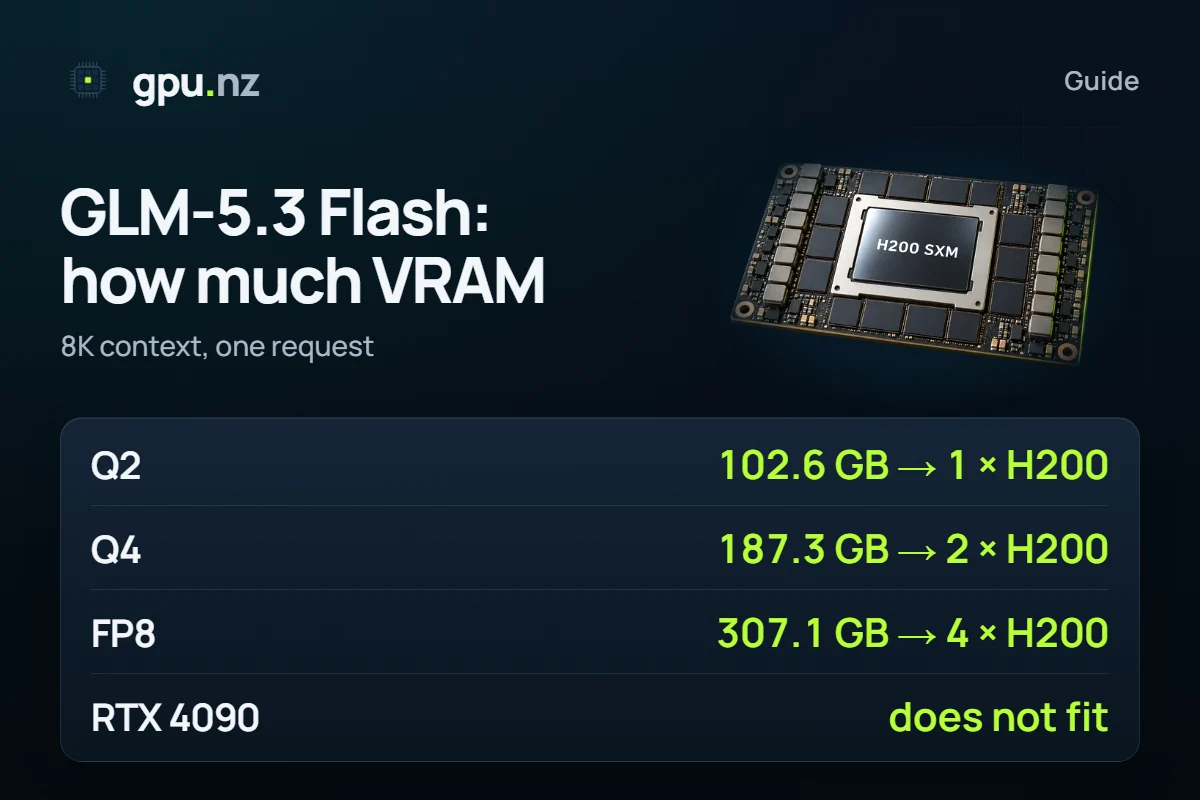
GLM-5.3 Flash at Q4 needs 187.3 GB of VRAM with an 8K context: that is 2 cards of 141 GB (H200) or 4 cards of 80 GB with headroom. Q2 squeezes it to 102.6 GB, which one H200 holds (75% of its memory). A single 24 GB RTX 4090 cannot run it at any quantisation: even Q2 takes 8 of those cards.
- Q4 (UD-Q4_K_XL), 8K context
- 187.3 GB
- Q4 (UD-Q4_K_XL), 8K context
- the fewest H200 cards for Q4
- 2 × 141 GB
- the fewest H200 cards for Q4
- Q2: one 141 GB card
- 102.6 GB
- Q2: one 141 GB card
- the original FP8 weights
- 307.1 GB
- the original FP8 weights
How much VRAM does GLM-5.3 Flash need?
187.3 GB at Q4, 102.6 GB at Q2 and 273.1 GB at Q6. That covers the weights, an 8K context cache and the runtime buffers for one request. Quantisation compresses the weights: fewer bits per weight mean less memory and, usually, a bigger loss in quality. More in our guide to GGUF quantisation.
- Q2UD-Q2_K_XL102.6 GB
- Q4UD-Q4_K_XL187.3 GB
- Q6UD-Q6_K_XL273.1 GB
- FP8original weights307.1 GB
The original FP8 weights take 307.1 GB, and BF16 takes 598.9 GB. According to the model card on Hugging Face, GLM-5.3 Flash has about 320B parameters, of which 18B are active per token; the Hugging Face counter shows 321B. The licence is MIT and the model is multimodal. But all 320B have to sit in memory, not 18B: the active parameters speed up the answer, they do not cut the number of cards.
For comparison, DeepSeek V4 Flash at Q4 takes 145.5 GB, which is 2 cards of H200 against 2 cards for GLM. It has its own write-up: DeepSeek V4 Flash. Sizes of every GLM version are on the GLM-5.3 Flash page.
Which GPUs does GLM-5.3 Flash need?
Weights and cache are split evenly between the cards (tensor parallelism), and each card keeps its own CUDA runtime memory. We take the smallest number of cards out of 1, 2, 4 and 8 that holds the model. A cell shows how many cards of that size you need; a dash means even eight are not enough.
| Quantisation | 24 GB | 48 GB | 80 GB | 96 GB | 141 GB |
|---|---|---|---|---|---|
| Q2 UD-Q2_K_XL · 102.6 GB | 8 | 4 | 2 | 2 | 1 |
| Q4 UD-Q4_K_XL · 187.3 GB | — | 8 | 4 | 4 | 2 |
| Q6 UD-Q6_K_XL · 273.1 GB | — | 8 | 4 | 4 | 2 tight |
| Original FP8 FP8 · 307.1 GB | — | 8 | 4 tight | 4 | 4 |
| BF16 BF16 · 598.9 GB | — | — | 8 tight | 8 | 8 |
“Tight” means more than 92% of the card's memory is used: the model starts, but a long request may not fit. The smallest realistic setups:
- Q2: 1 card of 141 GB (75% of memory) or 2 cards of 80 GB. This is the cheapest option, but we did not measure Q2 quality.
- Q4: 2 H200 cards (69% of each card) or 4 cards of 80 GB. This is the main option for real work.
- Original FP8: 4 H200 cards. The vLLM recipe for this model uses 8 × H200; with 80 GB cards you need 4, and tightly.
- 24 and 48 GB cards: Q2 fits 8 and 4 of them, Q4 fits 8 cards of 48 GB. The more cards, the more the speed depends on the links between them. We did not measure it.
This is a memory calculation. The vLLM recipe (recipes.vllm.ai) defaults to 8 × H200 with tensor parallelism and FP8, and names NVIDIA Hopper and newer as the floor. We have not run two-card or four-card setups.
Why one RTX 4090 or V100 is not enough
One card holds too little for the weights: the Q2 file is 109 GB and an RTX 4090 has 24 GB. Q2 fits only across 8 of them, and Q4 does not fit even across eight. The Tesla V100 comes in 16 and 32 GB: Q2 needs 8 and 4 of them respectively.
| Card | Q2, cards needed | Q4, cards needed |
|---|---|---|
| Tesla V100 16 16 GB | 8 | not even 8 |
| Tesla V100 32 32 GB | 4 | 8 |
| RTX 4090 24 GB | 8 | not even 8 |
| RTX 6000 Ada / RTX A6000 48 GB | 4 | 8 |
| H100 / A100 80 GB | 2 | 4 |
| H200 141 GB | 1 | 2 |
It is not only about capacity. The vLLM recipe names Hopper and newer as the floor, and the V100 is Volta, much older. One H200 with Q2 or two H200s with Q4 is simpler than assembling eight older cards. Look for servers in the catalog.
How much system RAM does GLM-5.3 Flash need?
If the whole model sits on the GPUs, system RAM is not the main limit: count by VRAM. Offloading layers to RAM is a different matter. llama.cpp can keep some layers in system memory; the -ngl option sets how many layers stay on the GPU. The model then runs on fewer cards, but slowly, because the RAM layers go through PCIe and the CPU. We did not measure the speed.
A rough estimate: whatever does not fit into VRAM has to sit in RAM, plus room for the system. With a single RTX 4090 that is about 79 GB for Q2 and about 164 GB for Q4. A server with that much RAM and one 24 GB card is easier to find than a multi-H200 one, but the answers will be much slower.
How much does a long context add?
Little. The calculator estimates the GLM-5.3 Flash context cache at about 11.3 KB per token plus a fixed part. A 128K context adds 1.3 GB, and the full million tokens add 10.9 GB. This is an estimate from the architecture, not a measurement.
| Context | Cache | Total, Q4 | Cards of 80 GB | Cards of 141 GB |
|---|---|---|---|---|
| 8K | 0.27 GB | 187.3 GB | 4 | 2 |
| 128K | 1.6 GB | 188.6 GB | 4 | 2 |
| 1M | 11.2 GB | 198.2 GB | 4 | 2 |
A million tokens at Q4 take 198.2 GB: still 2 H200 cards or 4 cards of 80 GB. The 1M-token limit comes from our data; the model card on Hugging Face does not state the context length outright.
Check your own setup
Pick the model, quantisation and context length: the calculator shows the memory and the catalog servers with enough cards, the cheapest first. Its context goes up to 128K.
What does an hour cost?
The price of an hour is the number of cards times the price of one. For Q4 that is 2 cards of 141 GB or 4 cards of 80 GB. Prices change every minute, so live cards are below: the H200 and the H100 both fit by memory.
How to run GLM-5.3 Flash on a rented server
We have no ready template for this model, so the setup is manual. The Hugging Face card gives commands for vLLM and SGLang, and the vLLM recipe describes the full layout. On 2026-11-06 the Ollama library has only the glm-5.3-flash:cloud tag, which runs on a remote service and not on your GPU, so you cannot run the model locally through Ollama. unsloth publishes the GGUF files for llama.cpp.
Connect over SSH
The connection command is on the server page. The template first starts its own default model; we replace it now.
Replace the model with GLM-5.3 Flash
Put the rental token in --api-key. The flags and variables come from the vLLM recipe, which asks for vLLM 0.29.0 or newer.
pkill -f api_server export VLLM_USE_RUST_FRONTEND=1 export VLLM_ENGINE_READY_TIMEOUT_S=3600 nohup vllm serve zai-org/GLM-5.3-Flash --host 0.0.0.0 --port 8000 \ --api-key <rental token> --tokenizer-mode glm5_next --tensor-parallel-size 8 \ --disable-flashinfer-autotune --tool-call-parser glm47 --enable-auto-tool-choice \ --reasoning-parser glm47 > /var/log/vllm.log 2>&1 & tail -f /var/log/vllm.logWait for the download
The model downloads and compiles, which takes longer than for small models. The server is ready when the log says the API has started.
Send a request
The API address is the «API (port 8000)» button on the server page. The model name in the request matches the vllm serve argument.
curl https://<id>-8000.run.gpu.nz/v1/chat/completions \ -H "Authorization: Bearer <token>" \ -H "Content-Type: application/json" \ -d '{"model": "zai-org/GLM-5.3-Flash", "messages": [{"role": "user", "content": "Hello"}]}'Delete the server when you are done
Billing is per minute. Save the results you need and delete the server: billing then stops entirely. A stopped server pays only for its disk, but another customer may rent its eight cards meanwhile.
The first download runs on a paid server
You pay for every card of the server while it runs, and the download counts too. The files weigh 109–328 GB: at 1 Gbit/s the original takes at least 44 min, and in practice longer. Delete the disk, and next time the model downloads again.
For one user and fewer cards, build llama.cpp on the Ubuntu + CUDA template and take a GGUF file (Q2 on one H200, Q4 on two). According to the unsloth page, this model needs a llama.cpp build with pull request #27754: check whether it has reached a release. llama.cpp splits the layers across all visible cards by itself:
apt-get update && apt-get install -y build-essential cmake git curl libcurl4-openssl-dev
git clone https://github.com/ggml-org/llama.cpp
cmake llama.cpp -B llama.cpp/build -DGGML_CUDA=ON
cmake --build llama.cpp/build --config Release -j --target llama-server
./llama.cpp/build/bin/llama-server -hf unsloth/GLM-5.3-Flash-GGUF:UD-Q4_K_XL \
--port 8080 -ngl 99 --ctx-size 32768The Ubuntu template has no web addresses, so forward the port over SSH from your computer and open http://localhost:8080:
ssh -p <port> -L 8080:localhost:8080 root@<address>What can go wrong
- The vLLM version. The recipe asks for vLLM 0.29.0 or newer and a recent FlashInfer. Check the version in the template with python3 -c "import vllm; print(vllm.__version__)"; if it is older, upgrade vLLM before you start.
- Images and video. The recipe notes that the Rust frontend does not accept images or video. For those, start vLLM with VLLM_USE_RUST_FRONTEND=0.
- Parallel requests multiply the cache. The figures above are for one request. In vLLM every concurrent request keeps its own cache, and vLLM takes up to 90% of each card by default. For an API, choose setups without the “tight” mark. On Hopper (H100, H200) the recipe requires a BF16 cache, as in our calculation.
- We did not measure speed. Every figure is a memory calculation. Answer speed depends on the number of cards, the links between them and RAM offloading, so test it on your own server before you build the model into a service.
How we counted
Weights are the real file sizes on Hugging Face: GGUF from unsloth/GLM-5.3-Flash-GGUF (the calculator lists UD-Q4_K_XL in the Q4_K_M slot) and the FP8 original from zai-org/GLM-5.3-Flash. The context cache is the calculator's estimate, 11.3 KB per token. The runtime is about 0.75 GB plus the logits buffer on each card. With several GPUs, weights and cache split evenly.
1 GB here is 1024³ bytes, as on GPUs, while Hugging Face shows decimal gigabytes: 328 GB instead of 305.8. Parameter counts come from the Hugging Face counter (the card says 320B). The active parameters, the licence and the commands come from the model card, the vLLM recipe and the unsloth page, read on 2026-11-06. Data as of 2026-10-19; the method is in the calculator, and one table for 35 models is in How much VRAM do open LLMs really need?. The general rule of thumb is in How much VRAM an LLM needs.
Questions and answers
- How much VRAM does GLM-5.3 Flash need?
- At Q4 with an 8K context it needs 187.3 GB, at Q2 102.6 GB and as the original FP8 307.1 GB. This is a calculation for one request: weights, cache and runtime memory.
- What GPUs does GLM-5.3 Flash need?
- For Q4: 2 cards of 141 GB (H200) or 4 cards of 80 GB with headroom. Q2 fits one 141 GB card, and the original FP8 needs 4 H200 cards by memory, while the vLLM recipe uses 8.
- Can GLM-5.3 Flash run on an RTX 4090 or a V100?
- Not on one card. The RTX 4090 has 24 GB, and even Q2 needs 8 of them. The V100 comes in 16 and 32 GB, and Q2 needs 8 and 4 of them. One H200 with Q2 is simpler.
- How much system RAM does GLM-5.3 Flash need?
- If the whole model sits on the GPUs, count by VRAM. When llama.cpp offloads layers to RAM, everything that does not fit the GPU has to sit in system memory: with one 24 GB card that is about 79 GB for Q2 and 164 GB for Q4. Answers are much slower then.
- Is GLM-5.3 Flash in Ollama?
- On 2026-11-06 the Ollama library has only the glm-5.3-flash:cloud tag. It runs on a remote service and not on your GPU, so you cannot run the model locally through Ollama.
- Does vLLM support GLM-5.3 Flash?
- Yes. The vLLM recipe describes a run on 8 H200 cards in FP8 and asks for vLLM 0.29.0 or newer and a Hopper or newer GPU. The vllm serve command is also on the model card on Hugging Face.


