9 min read ·
AI on a weak PC: which models fit 6, 8, 12 and 16 GB of VRAM
Qwen3.5 4B fits 6 GB, 9B fits 8 GB, Qwen3 14B fits 12 GB. Which models run on your VRAM and RAM, and when to rent a GPU.
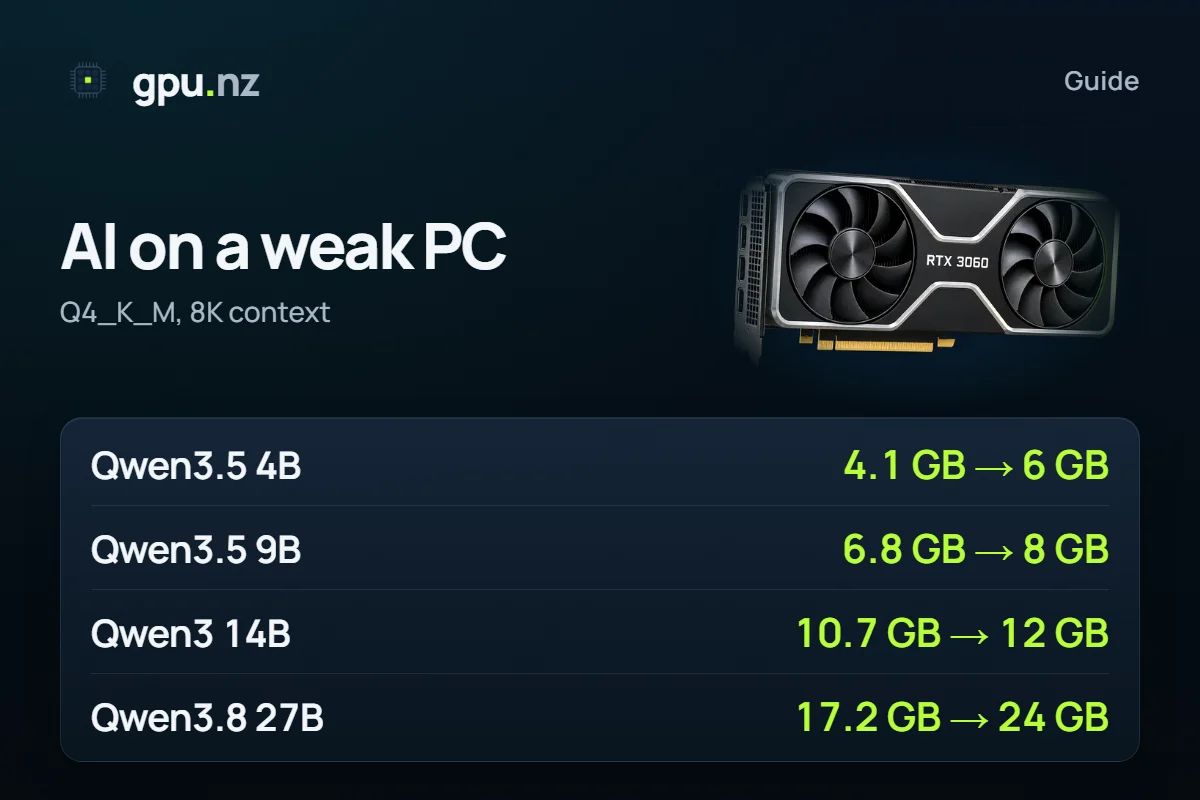
GPU memory (VRAM) decides which model runs on a weak PC. At Q4_K_M with an 8K context, Qwen3.5 4B needs 4.1 GB, Qwen3.5 9B 6.8 GB, Qwen3 14B 10.7 GB and Qwen3.8 27B 17.2 GB. So Qwen3.5 4B fits a 6 GB card, models up to 9B join at 8 GB, and Gemma 4 12B and Qwen3 14B at 12 GB. When memory is short, part of the model moves to system RAM and the model runs noticeably slower.
- Qwen3.5 4B: 6 GB card
- 4.1 GB
- Qwen3.5 4B: 6 GB card
- Qwen3.5 9B: 8 GB card
- 6.8 GB
- Qwen3.5 9B: 8 GB card
- Qwen3 14B: 12 GB card
- 10.7 GB
- Qwen3 14B: 12 GB card
- Qwen3.8 27B: 24 GB card
- 17.2 GB
- Qwen3.8 27B: 24 GB card
What fits in 6, 8, 12 and 16 GB of VRAM?
The table has your card's memory on the left and the models that fit it entirely on the right, at Q4_K_M and an 8K context. Context is the memory for the text the model has already read; 8K tokens is a few pages. We took the 8 models people ask about most.
| VRAM | Example cards | Fits entirely (Q4_K_M, 8K; GB of memory in brackets) | New on this step |
|---|---|---|---|
| 6 GB | RTX 3050 6 GB, GTX 1660 | Qwen3.5 4B (4.1) | Qwen3.5 4B |
| 8 GB | RTX 4060, RTX 3060 Ti | Qwen3.5 4B (4.1) Llama 3.1 8B (6.6) Qwen3.5 9B (6.8) Qwen3 8B (6.8) | Llama 3.1 8B Qwen3.5 9B Qwen3 8B |
| 12 GB | RTX 3060 12 GB | Qwen3.5 4B (4.1) Llama 3.1 8B (6.6) Qwen3.5 9B (6.8) Qwen3 8B (6.8) Gemma 4 12B (8.3) Qwen3 14B (10.7) | Gemma 4 12B Qwen3 14B |
| 16 GB | RTX 4060 Ti 16 GB | Qwen3.5 4B (4.1) Llama 3.1 8B (6.6) Qwen3.5 9B (6.8) Qwen3 8B (6.8) Gemma 4 12B (8.3) Qwen3 14B (10.7) GPT-OSS 20B (12.6) | GPT-OSS 20B |
| 24 GB | RTX 3090, RTX 4090 | Qwen3.5 4B (4.1) Llama 3.1 8B (6.6) Qwen3.5 9B (6.8) Qwen3 8B (6.8) Gemma 4 12B (8.3) Qwen3 14B (10.7) GPT-OSS 20B (12.6) Qwen3.8 27B (17.2) | Qwen3.8 27B |
- Qwen3.5 4B4.1 GB
- Llama 3.1 8B6.6 GB
- Qwen3.5 9B6.8 GB
- Qwen3 8B6.8 GB
- Gemma 4 12B8.3 GB
- Qwen3 14B10.7 GB
- GPT-OSS 20BMoE12.6 GB
- Qwen3.8 27B17.2 GB
12 GB is the step behind the query “12gb vram”. It runs Qwen3.5 4B, Llama 3.1 8B, Qwen3.5 9B, Qwen3 8B, Gemma 4 12B and Qwen3 14B. Qwen3 14B takes 10.7 GB, almost the whole card, so a long conversation will not fit. At 16 GB you add GPT-OSS 20B.
Fitting entirely in VRAM is the main condition. Qwen3.5 9B, Qwen3 8B and Llama 3.1 8B take about 6.8 GB, so 8 GB is enough with a little to spare. But Qwen3 8B at a 32K context already needs 10.2 GB and a 12 GB card: its cache grows faster than Qwen3.5's.
How big is a model file in gigabytes?
The file is smaller than the memory the model needs to run: the context cache and the CUDA runtime come on top of the weights. The Qwen3.5 4B file at Q4_K_M is 2.6 GB, Qwen3 8B 4.7 GB, Llama 3.1 8B 4.6 GB. Use the “File” columns for disk and download, the last column for VRAM.
| Model | Parameters | File Q4_K_M | File Q8_0 | File BF16 | Memory at 8K, Q4_K_M |
|---|---|---|---|---|---|
| Qwen3.5 4B | 4.7B | 2.6 GB | 4.2 GB | 7.8 GB | 4.1 GB |
| Llama 3.1 8B | 8B | 4.6 GB | — | 15.0 GB | 6.6 GB |
| Qwen3.5 9B | 9.7B | 5.3 GB | 8.9 GB | 16.7 GB | 6.8 GB |
| Qwen3 8B | 8.2B | 4.7 GB | 8.1 GB | 15.3 GB | 6.8 GB |
| Gemma 4 12B | 12B | 6.6 GB | 11.8 GB | 22.2 GB | 8.3 GB |
| Qwen3 14B | 14.8B | 8.4 GB | 14.6 GB | 27.5 GB | 10.7 GB |
| GPT-OSS 20B | 20.9B | 11.3 GB MXFP4 | — | — | 12.6 GB |
| Qwen3.8 27B | 27.8B | 15.3 GB | 27.1 GB | 50.9 GB | 17.2 GB |
Q8_0 is nearly twice the size of Q4_K_M, and BF16 is the original, uncompressed size. GPT-OSS 20B ships as one file in its native MXFP4. What these letters mean is in GGUF quantisation explained. Sizes here are in GiB (1024³ bytes), as GPUs report them; model stores may show a slightly bigger number.
How do I find out how much VRAM I have?
Two quick ways: Task Manager in Windows, and the nvidia-smi command for NVIDIA cards.
- Windows Task Manager. Press Ctrl+Shift+Esc, open Performance and pick the graphics card (GPU 0, GPU 1). Look for the “Dedicated GPU memory” line (the exact label depends on the Windows version). That is the card's VRAM.
- Do not mix it up with shared memory. “Shared GPU memory” is a part of ordinary RAM the card may borrow. It is not the card's own VRAM, so do not count it. Laptops often have two GPUs, integrated and discrete: you need the discrete one.
- nvidia-smi (Windows and Linux, NVIDIA cards). Open a terminal and run the command below. The size comes in MiB: divide by 1024 for GiB. It may read a little under the round number because the driver keeps some memory.
nvidia-smi --query-gpu=name,memory.total --format=csvAMD and Intel cards have no such command; use Task Manager or the vendor's tool.
Will Qwen3.5 “7B” run on a 6 GB card?
There is no Qwen3.5 7B in our table: the family has 4B and 9B versions. Qwen3.5 4B needs 4.1 GB and fits a 6 GB card (RTX 3050) with room to spare. Qwen3.5 9B at Q4_K_M needs 6.8 GB, which is an 8 GB card.
You can squeeze the 9B harder. The table below shows 5.9 GB at Q3_K_M and 5.4 GB at Q2. Only Q2 fits a 6 GB card. The tighter the compression, the more answer quality drops. We have not measured it, so the honest choice is the 4B at Q4_K_M or the 9B at Q2: try both on your own tasks.
| Model (8K context) | Q8_0 | Q6_K | Q4_K_M | Q3_K_M | Q2 |
|---|---|---|---|---|---|
| Qwen3.5 9B | 10.4 GB card 12 GB | 8.5 GB card 12 GB | 6.8 GB card 8 GB | 5.9 GB card 8 GB | 5.4 GB card 6 GB |
| Gemma 4 12B | 13.5 GB card 16 GB | 10.8 GB card 12 GB | 8.3 GB card 12 GB | 7.0 GB card 8 GB | 6.0 GB card 8 GB |
| Llama 3.1 8B | — | 8.1 GB card 12 GB | 6.6 GB card 8 GB | 5.7 GB card 6 GB | 5.0 GB card 6 GB |
In the Qwen3.5 and Gemma 4 rows, Q2 is the dynamic UD-Q2_K_XL; Llama 3.1 has plain Q2_K. Gemma 4 12B at Q3_K_M takes 7.0 GB and fits an 8 GB card, while at Q2 (6.0 GB) it still does not fit a 6 GB card.
What does system RAM add: 16 and 32 GB?
A model that does not fit in VRAM can still run with the help of RAM. llama.cpp and Ollama can keep some layers on the GPU and the rest in ordinary memory, computed on the CPU. It works but is noticeably slower, because those layers are computed by the CPU, which works with ordinary memory, slower than VRAM. We have no speed measurements, so we name no figures.
- Ollama. `ollama ps` shows in the PROCESSOR column where the model sits: `100% GPU` is entirely on the card, `100% CPU` entirely in system memory, `48%/52% CPU/GPU` partly in both. That is how the Ollama FAQ puts it.
- llama.cpp. The `-ngl` flag (`--n-gpu-layers`) sets how many layers to keep in VRAM. According to the llama.cpp help, the default is auto, and you can set a number yourself.
We count the RAM a model needs like VRAM: weights plus context cache. From 16 or 32 GB we subtract 8 GB for Windows, the browser and other programs. That is our assumption, not a measurement; your headroom may differ.
| Model | Memory at 8K | 16 GB of RAM | 32 GB of RAM |
|---|---|---|---|
| Qwen3.5 4B | 4.1 GB | enough | enough |
| Llama 3.1 8B | 6.6 GB | enough | enough |
| Qwen3.5 9B | 6.8 GB | enough | enough |
| Qwen3 8B | 6.8 GB | enough | enough |
| Gemma 4 12B | 8.3 GB | not enough | enough |
| Qwen3 14B | 10.7 GB | not enough | enough |
| GPT-OSS 20B | 12.6 GB | not enough | enough |
| Qwen3.8 27B | 17.2 GB | not enough | enough |
| Qwen3 30B-A3B | 19.1 GB | not enough | enough |
| Qwen3 32B | 21.4 GB | not enough | enough |
| Qwen3 Next 80B-A3B | 46.5 GB | not enough | not enough |
Which Qwen to take with 32 GB of RAM. By this table Qwen3 32B (21.4 GB), Qwen3 Coder 30B-A3B (19.1 GB), Qwen3 30B-A3B (19.1 GB), Qwen3.8 27B (17.2 GB) and Qwen3 14B (10.7 GB) fit. Start with Qwen3.8 27B: it is the newest in the table. Qwen3 Next 80B-A3B does not fit: it needs 46.5 GB. A long context eats the headroom too: Qwen3.8 27B at 128K tokens needs 24.7 GB, which does not fit 32 GB of RAM under our assumption.
With 16 GB of RAM the models up to 9B remain: Qwen3.5 4B, Llama 3.1 8B, Qwen3.5 9B and Qwen3 8B. That is what fits, not what feels pleasant to use. MoE models such as Qwen3 Coder 30B-A3B (19.1 GB) read only part of the weights per token, so a CPU usually copes with them more easily than with a dense model of the same size. We have not measured tokens per second: test on your own processor and memory.
When even RAM runs out
If the model does not fit in RAM either, Windows may start swapping memory to disk. The computer freezes and answers take very long. Close the browser and other programs, or pick a smaller model.
When is renting a 24 GB card better than upgrading?
Renting wins while you use a big model in bursts. Qwen3.8 27B needs 17.2 GB, which is a 24 GB card, and GPT-OSS 20B needs 12.6 GB and a 16 GB card. You would buy such a card outright, but you can rent it for an hour or a few minutes.
- Rent if you need a big model a few hours a week: for a test, a one-off job or a comparison of models.
- Buy or upgrade if you work with a model every day for many hours. Compare the shop price of a card with the price cards below, and count how many hours a month you really work.
- Keep your card if Qwen3.5 9B or Gemma 4 12B is enough: those models fit your VRAM, and renting would only add cost.
Check your own model in the calculator: pick the quantisation and the context, and it shows the memory and the catalog cards that fit.
How to run a bigger model on a rented card
A running server costs money
Billing runs per minute from the start. When your test is done, stop the server. A stopped server costs only its disk, and a deleted disk cannot be brought back.
Pick a card
Qwen3.8 27B needs a 24 GB card; Qwen3 14B is fine on 12 GB, for example an RTX 3060 12 GB. More memory comes with the RTX 4090.
Choose a template
Qwen3.8 27B has a ready Qwen 3.8 template: the chat and the model work without setup. For the other models use Open WebUI + Ollama and type a tag into the Model field, such as qwen3:14b or qwen3.5:9b.
Wait 2–5 minutes
The server starts and the model downloads on first start.
Open the chat
The Open WebUI button on the server page opens the chat. You can pull another model there or over SSH.
ollama pull qwen3.5:9bStop the server
Billing is per minute: a stopped server costs nothing for the GPU, only its disk.
How to run a model with no GPU at all is in Local AI without a powerful PC. Which models to pull in Ollama by memory step are in the Ollama roundup.
What can go wrong
- Context grows. The figures are for 8K. With a longer context the cache grows, and a model that barely fit the card stops fitting.
- Thinking uses context. Qwen3 and Qwen3.5 think first by default, so answers get longer. That eats cache memory.
- Ollama tags are different builds. The size of a tag in the Ollama library differs a little from the GGUF in our data. If the fit is tight, take the next card size.
- VRAM is already in use. Windows, the browser and games hold part of VRAM. Close them before loading a model, or your real headroom is smaller than the estimate.
- A laptop with two GPUs. Make sure the program uses the discrete card, not the integrated one.
How we counted
Weights are the real GGUF file sizes on Hugging Face; GPT-OSS 20B is its native MXFP4. The context cache is computed from each model's config.json, FP16 cache. The CUDA runtime is about 0.75 GB plus the logits buffer. A card counts as enough when the model takes at most 97.5% of its memory. For RAM we use the same estimate and an assumed 8 GB kept for the system. 1 GB here is 1024³ bytes. Data as of 2026-10-19; a table of 35 models is in How much VRAM do open LLMs really need?, the Qwen family in Which Qwen model to run, and the calculator on its own page.
Questions and answers
- Which Qwen model suits 32 GB of RAM?
- With 8 GB of 32 GB kept for the system, Qwen3 32B (21.4 GB), Qwen3 Coder 30B-A3B (19.1 GB), Qwen3 30B-A3B (19.1 GB), Qwen3.8 27B (17.2 GB) and Qwen3 14B (10.7 GB) fit. Start with Qwen3.8 27B, the newest in our table. Qwen3 Next 80B-A3B does not fit (46.5 GB). On a CPU a model runs noticeably slower than on a GPU, and we have no speed figures.
- Will Qwen 3.5 7B run on an RTX 3050 6 GB?
- There is no Qwen3.5 7B in our table, only 4B and 9B. Qwen3.5 4B needs 4.1 GB and fits 6 GB. Qwen3.5 9B at Q4_K_M needs 6.8 GB and an 8 GB card; it fits 6 GB only at Q2 (5.4 GB), with a loss in quality.
- What runs on 12 GB of VRAM?
- Qwen3.5 4B, Llama 3.1 8B, Qwen3.5 9B, Qwen3 8B, Gemma 4 12B and Qwen3 14B run entirely on 12 GB at Q4_K_M and an 8K context. The heaviest of them, Qwen3 14B, takes 10.7 GB, almost the whole card. Qwen3.8 27B (17.2 GB) needs a 24 GB card.
- How big are Qwen3 8B, Qwen 4B and Llama 3.1 8B in GB?
- At Q4_K_M the Qwen3.5 4B file is 2.6 GB, Qwen3 8B 4.7 GB and Llama 3.1 8B 4.6 GB. VRAM needs more: with an 8K context cache it is 4.1 GB, 6.8 GB and 6.6 GB. At Q8_0 Qwen3 8B needs 10.3 GB.
- How do I check how much VRAM I have?
- Open Task Manager (Ctrl+Shift+Esc), go to Performance, pick the graphics card and find the dedicated GPU memory line. For NVIDIA cards, the command nvidia-smi --query-gpu=name,memory.total --format=csv prints the size in MiB. “Shared GPU memory” is ordinary RAM and does not count as VRAM.
- Can I run a model from system RAM, and how fast is it?
- Yes: llama.cpp and Ollama can keep some layers in RAM and compute them on the CPU, but it is noticeably slower than running fully on a GPU. We have no tokens-per-second measurements for specific processors and cards, such as an i9 with an RTX 4060, so we name no figures. Test the speed on your own machine, or rent a card for a few minutes.


